I was quite confused for a long time and was thinking what is going on, when my favorite web based mail was behaving oddly. I don't know whether the problem is universal or not, but it is in my case. I can't work on Yahoo! Mail from Opera 9.21.
Saturday, September 27, 2008

Friday, September 26, 2008
How to change User Passwords in Linux
In Linux you can easily change the password of your own account or other's account (if you have root account), through a very simple command from the terminal.
This command will suffice your job. Just type in the command in the terminal and then you will be prompted for your current password. Type your current password and then you will be prompted for the new password (the password you now ). You will be prompted for your new password twice. Now your password has been changed.
Change your own Password
If you want to change the password of your own account:passwd
This command will suffice your job. Just type in the command in the terminal and then you will be prompted for your current password. Type your current password and then you will be prompted for the new password (the password you now ). You will be prompted for your new password twice. Now your password has been changed.
Monday, September 8, 2008
How to Design stylish variable width Web 2.0 Tabs Menu for your Web Applications
We use to see several types of navigation around different websites. Tabs are also one of the attractive navigation styles prevailing today. Thought they are stylish and useful to users, they never take up much of your real estate. But whenever you are creating tabs, you should not create fixed-width tabs. Then you will need to assign the maximum width to all items. That is space consuming and many times becomes ugly.
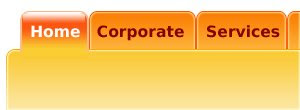 Hence you should design tabs which will take space as per the menu items. Here is how you can do it easily. You can create tabs just as in this image in few minutes. First you have to get the design as you want for your tabs. Now you need to slice them out to get these following pieces which will form your tab.
Here are two sets of tabs, one for inactive tabs and another for active tabs. You can have the third one to set on mouseover condition.
 Hence you should design tabs which will take space as per the menu items. Here is how you can do it easily. You can create tabs just as in this image in few minutes. First you have to get the design as you want for your tabs. Now you need to slice them out to get these following pieces which will form your tab.
Here are two sets of tabs, one for inactive tabs and another for active tabs. You can have the third one to set on mouseover condition.
Subscribe to:
Posts (Atom)